Showing posts with label Algorithms. Show all posts

Sunday, August 19, 2012

Integer Rounding in ANSI C

1.Unsigned Integers

When two unsigned integers are divided, the result will be rounded down.
result = numerator / denominator;
To round up a result you must apply the following idiom:
result = (numerator + denominator - 1) / denominator;
Example:
#include<stdio.h>

int main(void)
{
    unsigned int numerator   = 50;
    unsigned int denominator = 25;
    unsigned int upResult;
    unsigned int downResult;
    double fResult;
    int i;

    for(i = 0; i < 25; i++)
    {
        fResult = (double)(numerator)/(double)(denominator);
        upResult = (numerator + denominator - 1)/denominator;
        downResult = numerator/denominator;
        printf("Numerator %3u||Denominator %3u||Result %3.2f||"
               "Round up %3u||Round down %3u\n",
               numerator, denominator, fResult, upResult, downResult);
        numerator++;
    }
    return 0;
}
/*Output:
Numerator  50||Denominator  25||Result 2.00||Round up   2||Round down   2
Numerator  51||Denominator  25||Result 2.04||Round up   3||Round down   2
Numerator  52||Denominator  25||Result 2.08||Round up   3||Round down   2
Numerator  53||Denominator  25||Result 2.12||Round up   3||Round down   2
Numerator  54||Denominator  25||Result 2.16||Round up   3||Round down   2
Numerator  55||Denominator  25||Result 2.20||Round up   3||Round down   2
Numerator  56||Denominator  25||Result 2.24||Round up   3||Round down   2
Numerator  57||Denominator  25||Result 2.28||Round up   3||Round down   2
Numerator  58||Denominator  25||Result 2.32||Round up   3||Round down   2
Numerator  59||Denominator  25||Result 2.36||Round up   3||Round down   2
Numerator  60||Denominator  25||Result 2.40||Round up   3||Round down   2
Numerator  61||Denominator  25||Result 2.44||Round up   3||Round down   2
Numerator  62||Denominator  25||Result 2.48||Round up   3||Round down   2
Numerator  63||Denominator  25||Result 2.52||Round up   3||Round down   2
Numerator  64||Denominator  25||Result 2.56||Round up   3||Round down   2
Numerator  65||Denominator  25||Result 2.60||Round up   3||Round down   2
Numerator  66||Denominator  25||Result 2.64||Round up   3||Round down   2
Numerator  67||Denominator  25||Result 2.68||Round up   3||Round down   2
Numerator  68||Denominator  25||Result 2.72||Round up   3||Round down   2
Numerator  69||Denominator  25||Result 2.76||Round up   3||Round down   2
Numerator  70||Denominator  25||Result 2.80||Round up   3||Round down   2
Numerator  71||Denominator  25||Result 2.84||Round up   3||Round down   2
Numerator  72||Denominator  25||Result 2.88||Round up   3||Round down   2
Numerator  73||Denominator  25||Result 2.92||Round up   3||Round down   2
Numerator  74||Denominator  25||Result 2.96||Round up   3||Round down   2
*/
To round to the nearest integer you have 2 methods:
Method 1:
iResult1 = (unsigned int) ( (double)(numerator) / (double)(denominator) + 0.5);
Method 2:
iResult2 = (numerator + denominator / 2) / denominator;
Observation: The second method is preferred to the first method because is faster and doesn't use floating-point division.  Also, this method is preferred if you work with embedded systems.

Example:
#include<stdio.h>

int main(void)
{
    unsigned int numerator   = 50;
    unsigned int denominator = 25;
    unsigned int iResult1;
    unsigned int iResult2;
    double fResult;
    int i;

    for(i = 0; i < 25; i++)
    {
        fResult = (double)(numerator)/(double)(denominator);
        iResult1 = (int) ( (double)(numerator) / (double)(denominator) + 0.5);
        iResult2 = (numerator + denominator/2) / denominator;
        printf("Numerator %3u||Denominator %3u||Result %3.2f||"
               "Nearest_1 %3u||Nearest_2 %3u\n",
               numerator, denominator, fResult, iResult1, iResult2);
        numerator++;
    }
    return 0;
}
/*Output:
Numerator  50||Denominator  25||Result 2.00||Nearest_1   2||Nearest_2   2
Numerator  51||Denominator  25||Result 2.04||Nearest_1   2||Nearest_2   2
Numerator  52||Denominator  25||Result 2.08||Nearest_1   2||Nearest_2   2
Numerator  53||Denominator  25||Result 2.12||Nearest_1   2||Nearest_2   2
Numerator  54||Denominator  25||Result 2.16||Nearest_1   2||Nearest_2   2
Numerator  55||Denominator  25||Result 2.20||Nearest_1   2||Nearest_2   2
Numerator  56||Denominator  25||Result 2.24||Nearest_1   2||Nearest_2   2
Numerator  57||Denominator  25||Result 2.28||Nearest_1   2||Nearest_2   2
Numerator  58||Denominator  25||Result 2.32||Nearest_1   2||Nearest_2   2
Numerator  59||Denominator  25||Result 2.36||Nearest_1   2||Nearest_2   2
Numerator  60||Denominator  25||Result 2.40||Nearest_1   2||Nearest_2   2
Numerator  61||Denominator  25||Result 2.44||Nearest_1   2||Nearest_2   2
Numerator  62||Denominator  25||Result 2.48||Nearest_1   2||Nearest_2   2
Numerator  63||Denominator  25||Result 2.52||Nearest_1   3||Nearest_2   3
Numerator  64||Denominator  25||Result 2.56||Nearest_1   3||Nearest_2   3
Numerator  65||Denominator  25||Result 2.60||Nearest_1   3||Nearest_2   3
Numerator  66||Denominator  25||Result 2.64||Nearest_1   3||Nearest_2   3
Numerator  67||Denominator  25||Result 2.68||Nearest_1   3||Nearest_2   3
Numerator  68||Denominator  25||Result 2.72||Nearest_1   3||Nearest_2   3
Numerator  69||Denominator  25||Result 2.76||Nearest_1   3||Nearest_2   3
Numerator  70||Denominator  25||Result 2.80||Nearest_1   3||Nearest_2   3
Numerator  71||Denominator  25||Result 2.84||Nearest_1   3||Nearest_2   3
Numerator  72||Denominator  25||Result 2.88||Nearest_1   3||Nearest_2   3
Numerator  73||Denominator  25||Result 2.92||Nearest_1   3||Nearest_2   3
Numerator  74||Denominator  25||Result 2.96||Nearest_1   3||Nearest_2   3
*/
2.Signed Integers

The formulas described above cannot apply to signed integers when the denominator and numerator are of different signs (one is positive and the other one is negative or vice-versa). For computing the nearest integer after division you can use the following functions:
/*
 * Description:
 *  Returns the rounded result of the division
 * Parameters:
 *  numerator - the numerator
 *  denominator - the denominator
 * Returns:
 *  The nearest integer of the result
 */
int Round_Division1(int numerator, int denominator)
{
    int result;

    if( ( (numerator > 0) && (denominator < 0) ) ||
        ( (numerator < 0) && (denominator > 0) ) )
    {
        result = (int) ( (double)(numerator) / (double)(denominator) + 0.5);
    }
    else
    {
        result = (int) ( (double)(numerator) / (double)(denominator) - 0.5);
    }
    return result;
}
/*
 * Description:
 *  Returns the rounded result of the division
 * Parameters:
 *  numerator - the numerator
 *  denominator - the denominator
 * Returns:
 *  The nearest integer of the result
 */
int Round_Division2(int numerator, int denominator)
{
    int result;

    if( ( (numerator > 0) && (denominator < 0) ) ||
        ( (numerator < 0) && (denominator > 0) ) )
    {
        result = ( numerator - (denominator/2) ) / denominator;
    }
    else
    {
        result = ( numerator + (denominator/2 )) / denominator;
    }
    return result;
}
Example:
#include<stdio.h>

int Round_Division1(int numerator, int denominator);
int Round_Division2(int numerator, int denominator);

int main(void)
{
    int numerator   = -50;
    int denominator = 25;
    int iResult1;
    int iResult2;
    double fResult;
    int i;

    for(i = 0; i < 25; i++)
    {
        fResult = (double)(numerator)/(double)(denominator);
        iResult1 = Round_Division1(numerator,denominator);
        iResult2 = Round_Division2(numerator,denominator);
        printf("Numerator %3d||Denominator %3d||Result %3.2f||"
                "Nearest_1 %3d||Nearest_2 %3d\n",
                numerator, denominator, fResult, iResult1, iResult2);
        numerator++;
    }
    return 0;
}
/*Output:
Numerator -50||Denominator  25||Result -2.00||Nearest_1  -2||Nearest_2  -2
Numerator -49||Denominator  25||Result -1.96||Nearest_1  -2||Nearest_2  -2
Numerator -48||Denominator  25||Result -1.92||Nearest_1  -2||Nearest_2  -2
Numerator -47||Denominator  25||Result -1.88||Nearest_1  -2||Nearest_2  -2
Numerator -46||Denominator  25||Result -1.84||Nearest_1  -2||Nearest_2  -2
Numerator -45||Denominator  25||Result -1.80||Nearest_1  -2||Nearest_2  -2
Numerator -44||Denominator  25||Result -1.76||Nearest_1  -2||Nearest_2  -2
Numerator -43||Denominator  25||Result -1.72||Nearest_1  -2||Nearest_2  -2
Numerator -42||Denominator  25||Result -1.68||Nearest_1  -2||Nearest_2  -2
Numerator -41||Denominator  25||Result -1.64||Nearest_1  -2||Nearest_2  -2
Numerator -40||Denominator  25||Result -1.60||Nearest_1  -2||Nearest_2  -2
Numerator -39||Denominator  25||Result -1.56||Nearest_1  -2||Nearest_2  -2
Numerator -38||Denominator  25||Result -1.52||Nearest_1  -2||Nearest_2  -2
Numerator -37||Denominator  25||Result -1.48||Nearest_1  -1||Nearest_2  -1
Numerator -36||Denominator  25||Result -1.44||Nearest_1  -1||Nearest_2  -1
Numerator -35||Denominator  25||Result -1.40||Nearest_1  -1||Nearest_2  -1
Numerator -34||Denominator  25||Result -1.36||Nearest_1  -1||Nearest_2  -1
Numerator -33||Denominator  25||Result -1.32||Nearest_1  -1||Nearest_2  -1
Numerator -32||Denominator  25||Result -1.28||Nearest_1  -1||Nearest_2  -1
Numerator -31||Denominator  25||Result -1.24||Nearest_1  -1||Nearest_2  -1
Numerator -30||Denominator  25||Result -1.20||Nearest_1  -1||Nearest_2  -1
Numerator -29||Denominator  25||Result -1.16||Nearest_1  -1||Nearest_2  -1
Numerator -28||Denominator  25||Result -1.12||Nearest_1  -1||Nearest_2  -1
Numerator -27||Denominator  25||Result -1.08||Nearest_1  -1||Nearest_2  -1
Numerator -26||Denominator  25||Result -1.04||Nearest_1  -1||Nearest_2  -1
*/

Friday, August 17, 2012

Euclid's GCD Algorithm in ANSI C

In mathematics, Euclid's algorithm is a simple yet efficient method for computing the greatest common divisor of two positive integers.

There are 3 possible implementation for Euclid's algorithm:
1. Division-Based Euclid
/*
 * Description:
 *  Returns the greatest common denominator of a and b using the
 *  Euclid's algorithm division-based.
 * Parameters:
 *  a,b - two positive integers
 * Returns:
 *  the greatest common denominator
 */
int Euclid_Gcd_Division(int a, int b)
{
    int temp;
    while(b!=0)
    {
        temp = b;
        b = a % b;
        a = temp;
    }
    return abs(a);
}
Here's numeric example on how the algorithm works:
Phase a b temp
Initialization 32 15 Undefined
Step 1 15 2 15
Step 2 2 1 2
Step 3 1 0 1
In Step 3, b becomes equal to 0 and the while loop is exited. The result will be the content of a.

2.Subtraction-based Euclid
/*
 * Description:
 *  Returns the greatest common denominator of a and b using the
 *  Euclid's algorithm subtraction-based.
 * Parameters:
 *  a,b - two positive integers
 * Returns:
 *  the greatest common denominator
 */
int Euclid_Gcd_Subtraction(int a, int b)
{
    a = abs(a);
    b = abs(b);
    if (a != 0)
    {
        while (b != 0)
        {
            if (a > b)
            {
                a = a - b;
            }
            else
            {
                b = b - a;
            }
        }
    }
    return a;
}
Here's a numeric example on how the algorithm works:
Phase a b Observation
Input -32 15
Initialization 32 15 a>b
Step 1 17 15 a>b
Step 2 2 15 a<b
Step 3 2 13 a<b
Step 4 2 11 a<b
Step 5 2 9 a<b
Step 6 2 7 a<b
Step 7 2 5 a<b
Step 8 2 3 a<b
Step 9 2 1 a>b
Step 10 1 1 a>b
Step 11 1 0 b>=a (else branch)
In Step 11, b becomes equal to 0 and the while loop is exited. The result will be the content of a.

3.Recursion-based Euclid
/*
 * Description:
 *  Returns the greatest common denominator of a and b using the
 *  Euclid's algorithm recursion-based.
 * Parameters:
 *  a,b - two positive integers
 * Returns:
 *  the greatest common denominator
 */
int Euclid_Gcd_Recursion(int a, int b)
{
    int result;
    if (b == 0)
    {
        result = a;
    }
    else
    {
        result = Euclid_Gcd_Recursion(b, a % b);
    }
    return abs(result);
}
The algorithm is the same as the division-based Euclid algorithm. The difference is that this is algorithm is recursive, while the division-based Euclid is iterative.
4.Example
#include<stdio.h>
#include<stdlib.h>

int Euclid_Gcd_Division(int a, int b);
int Euclid_Gcd_Subtraction(int a, int b);
int Euclid_Gcd_Recursion(int a, int b);

int main(void)
{
    int a = 580;
    int b = -320;
    printf("Euclid division based   : %d\n"
           "Euclid subtraction based: %d\n"
           "Euclid recursion based  : %d\n",
            Euclid_Gcd_Division(a,b),
            Euclid_Gcd_Subtraction(a,b),
            Euclid_Gcd_Recursion(a,b));
    return 0;
}

Generic Bitcount Algorithm in ANSI C

The purpose of the Bitcount algorithm is to return the number of bits set to 1 in a memory block.

A simple implementation of the Bitcount algorithm would be:
/*
 * Description:
 *  The function returns the number of bits set the 1 in a integer
 * Parameters:
 *  data - the integer who will be verified
 * Returns:
 *  The number of bits set to 1
 */
int SimpleBitCount(unsigned long data)
{
    /*Calculates the number of bits in a unsigned integer*/
    int size = sizeof(data) * 8;
    int counter = 0;
    /*Sets the first bit of the mask*/
    unsigned long mask = 0x0001U;
    int i;
    for(i = 0; i < size; i++)
    {
        /*Checks if an 1 was encountered*/
        if( (mask & data) !=0)
        {
            counter++;
        }
        /*Sets the next bit of the mask, clears the bit before*/
        mask<<=1;
    }
    return counter;
}
The main disadvantage of this implementation is that the data must be a integer or convertible to an integer.
Example:
#include<stdio.h>

int SimpleBitCount(unsigned long data);

int main(void)
{
    unsigned long v1 = 1539;

    long v1_ones   = SimpleBitCount(v1);
    long v1_zeroes = (sizeof(unsigned long)*8) - v1_ones;

    printf("Size %d bits\nOnes: %ld bits\nZeroes: %ld bits",
            sizeof(unsigned long)*8, v1_ones, v1_zeroes);

    return 0;
}
/*Output:
Size 32 bits
Ones: 4 bits
Zeroes: 28 bits
 */
To eliminate the the disadvantage mentioned before we need to make the sent data generic using a void pointer. Since, we couldn't possibly know the size of the sent data we must send the size of the data as a parameter.
/*
 * Description:
 *  The function returns the number of bits set the 1 in a memory block
 * Parameters:
 *  data - a generic pointer to the memory block
 *  bytes - the size of the memory block in bytes
 * Returns:
 *  The number of bits set to 1 in the memory block
 */
long GenericBitCount(void* data, size_t bytes)
{
    unsigned char* iterator = NULL;
    unsigned char  mask;
    unsigned int i, j;
    long counter = 0;

    /*Positions the iterator at the beginning of the memory block*/
    iterator = data;
    /*Iterates through all the bytes in the memory block*/
    for (i = 0; i < bytes; i++)
    {
        /*Reinitializes the mask for checking the first bit*/
        mask = 1;
        /*Iterates through all the bits of a byte from the memory block*/
        for (j = 0; j < 8; j++)
        {
            /*Checks if an 1 was encountered*/
            if ( ( (*iterator) & mask ) !=0 )
            {
                counter++;
            }
            /*Modifies the mask so the next bit from the byte can be checked*/
            mask <<= 1;
        }
        /*Moves the the next byte*/
        iterator = iterator + 1;
    }
    return counter;
}
Example:
#include<stdio.h>
#include<string.h>

typedef struct
{
    char firstByte;
    char secondByte;
}SampleStruct;

long GenericBitCount(void* data, size_t bytes);

int main(void)
{
    unsigned long v1 = 1539;
    char v2[] = "The bird is the word";
    SampleStruct v3 = {0xFF, 0xFF};

    long v1_ones   = GenericBitCount(&v1,sizeof(unsigned long));
    long v1_zeroes = (sizeof(unsigned long)*8) - v1_ones;

    long v2_ones   = GenericBitCount(&v2,sizeof(char) * strlen(v2));
    long v2_zeroes = (sizeof(char) * strlen(v2)*8) - v2_ones;

    long v3_ones   = GenericBitCount(&v3,sizeof(SampleStruct));
    long v3_zeroes = (sizeof(SampleStruct)) * 8 - v3_ones;

    printf("v1 : Size %5d bits Ones: %5ld bits Zeroes: %5ld bits\n"
           "v2 : Size %5d bits Ones: %5ld bits Zeroes: %5ld bits\n"
           "v3 : Size %5d bits Ones: %5ld bits Zeroes: %5ld bits\n",
           sizeof(unsigned long)*8, v1_ones, v1_zeroes,
           sizeof(char)*strlen(v2)*8, v2_ones, v2_zeroes,
           sizeof(SampleStruct)*8, v3_ones, v3_zeroes );

    return 0;
}
/*Output:
v1 : Size    32 bits Ones:     4 bits Zeroes:    28 bits
v2 : Size   160 bits Ones:    67 bits Zeroes:    93 bits
v3 : Size    16 bits Ones:    16 bits Zeroes:     0 bits
 */
As you observed in the example above, the generic bitcount algorithm can any type of data as opposite to the simple bitcount algorithm who can only work with integers.

Monday, August 6, 2012

Reversing a String in ANSI C

If you're not familiar with how strings are represented in ANSI C, you should read this first:

We shall reverse the string in situ, without using an additional string. The implementation for this function is:
/**
 * Description:
 *  Reverses the received string.
 * Parameters:
 *  string - a pointer to the string who will be reversed
 * Returns:
 *  A pointer to the reversed string.
 * Postconditions:
 *  The "original" string who is sent will be reversed.
 */
char* String_Reverse(char *string)
{
   size_t last;
   int i;
   char swap;

   if(string!=NULL)
   {
      /*Computes the location of the last character*/
      last = strlen(string)-1;
      /*Itterates through the first half of the string*/
      for(i=0; i<(last/2); i++)
      {
         /*Swaps the first character with the last and so on*/
         swap = string[i];
         string[i] = string[last-i-1];
         string[last-i-1] = swap;
      }
   } 

 return string;
}
Here's an example on how to use the function:
#include<stdio.h>
#include<stdlib.h>
#include<string.h>

char* String_Reverse(char *string);

int main(void)
{
   char string[] = "The simple pleasures are the last refuge of complex men";
   printf("Original string: %s\n", string);
   String_Reverse(string);
   printf("Reversed string: %s\n", string);
   return 0;
}
/*Output:
Original string: The simple pleasures are the last refuge of complex men
Reversed string: nem xelpmoc fo egufer tsal eht era serusaelp elpmis ehT
 */

Thursday, August 2, 2012

Defining an Object for the GDS Library

If you don't know about the basics of the GDS library, be sure to read this first:

In order to work with the data structures defined in the GDS library, your structure (which we shall call an object from now on) must be defined in a certain way. In this article I will provide you with a simple example on how to define such an object.

The first thing that you must do is the structure declaration:
typedef struct
{
   int value;
}Integer;
The structure above is a simple wrapper for a integer, containing only one member who shall represent the value of the integer.

The object must implement the following operations defined by the Interface data structure:
Operation Description
Copy Creates a hard copy of the object
Compare Compares an object with another object of the same type.
Destroy Frees the memory allocated for the current object
Our example implementation is:
Integer* Integer_Copy(const Integer* integer)
{
   Integer *i = NULL;
   i = malloc(sizeof(Integer));
   i->value = integer->value;
   return i;
}

Integer* Integer_Destroy(Integer* integer)
{
   free(integer);
   return NULL;
}

int Integer_Compare(const Integer* i1, const Integer* i2)
{
   return (*(int*)(i1->value) - *(int*)(i2->value));
}
As you probably observed in the int Integer_Compare(const Integer *i1, const Integer *i2) the member value of the Integer object uses a double cast. This must be done because the interface functions have void* parameters.

Also, I consider good practice to define an "constructor"-like function for the structure:
Integer* Integer_Create(int value)
{
   Integer *i = NULL;
   i = malloc(sizeof(Integer));
   i->value = value;
   return i;
}
To see the full source check the following links:

Friday, July 27, 2012

Temperature Conversion Library in Java

This library allows you to perform conversion between the Celsius, Kelvin, Rankine, Delisile, Newton, Reaumur, Romer and Fahrenheit temperature scales.

Here's an example on how to use the library:
package temperatureconversion;

public class TestLauncher
{
    public static void main(String[] args)
    {
        Temperature t1 = Temperature.fromCelsius(-273.15);
        Temperature t2 = Temperature.fromKelvin(0.0);
        System.out.println("Kelvin degrees    : " + t1.toKelvin()     +"\n" +
                           "Celsius degrees   : " + t1.toCelsius()    +"\n" +
                           "Delisle degrees   : " + t1.toDelisle()    +"\n" +
                           "Newton degrees    : " + t1.toNewton()     +"\n" +
                           "Rankine degrees   : " + t1.toRankine()    +"\n" +
                           "Reaumur degrees   : " + t1.toReaumur()    +"\n" +
                           "Fahrenheit degrees: " + t1.toFahrenheit() +"\n" +
                           "Romer degrees     : " + t1.toRomer()      +"\n" );
        System.out.println("Kelvin degrees    : " + t2.toKelvin()     +"\n" +
                           "Celsius degrees   : " + t2.toCelsius()    +"\n" +
                           "Delisle degrees   : " + t2.toDelisle()    +"\n" +
                           "Newton degrees    : " + t2.toNewton()     +"\n" +
                           "Rankine degrees   : " + t2.toRankine()    +"\n" +
                           "Reaumur degrees   : " + t2.toReaumur()    +"\n" +
                           "Fahrenheit degrees: " + t2.toFahrenheit() +"\n" +
                           "Romer degrees     : " + t2.toRomer()      +"\n" );
    }
}

Pangram Checking Algorithm in ANSI C

A pangram is a sentence that contains at least once all the letters of the alphabet. A well known pangram in the English language is the sentence "A quick brown fox jumps over the lazy dog".

To check if a string is a pangram we must implement a flag vector containing entries for each letter of the alphabet. A flag will be set if the corresponding letter is found in the string. If all flags from the flag vector are set, then the string is pangram.

An implementation for this function would be:
/*
 * Description:
 *  Verifies is the string is a pangram
 * Parameters:
 *  string - a pointer to the string
 * Returns:
 *  true - if the word is a pangram
 *  false - if the word is not a pangram
 */
bool IsPangram(char* string)
{
   bool alphabetFlags[NUMBER_OF_LETTERS];
   int size = strlen(string);
   bool isPangram = true;
   char c;
   int i;

   /*Initializes all alphabet flags to false*/
   for(i=0; i<NUMBER_OF_LETTERS; i++)
   {
      alphabetFlags[i] = false;
   }
   /*For every unique letter the string contains an
    alphabet flag will be set to true*/
   for(i=0; i<size; i++)
   {
      c = tolower(string[i]);
      if(islower(c))
      {
         alphabetFlags[string[i]-'a']=true;
      }
   }
   /*If the string is a pangram every flag will be set to true*/
   for(i=0; (i<NUMBER_OF_LETTERS && isPangram==true); i++)
   {
      if(alphabetFlags[i]==false)
      {
         isPangram=false;
      }
   }
   return isPangram;
}
The function initializes all flags from the bool vector to false. After that, it checks every letter character from the string and sets the corresponding flag in the bool vector. If all flags are set, then the string is pangram.

Example
#include<stdio.h>
#include<string.h>
#include<stdbool.h>
#include<ctype.h>

#define NUMBER_OF_LETTERS 26

bool IsPangram(char* string);

int main(void)
{
   char pangram1[] = "The quick brown fox jumps over the lazy dog";
   char pangram2[] = "Bird, bird, bird! The bird is the word!";
   if(IsPangram(pangram1))
   {
      printf("<%s> is a pangram\n",pangram1);
   }
   else
   {
      printf("<%s> is not a pangram\n",pangram1);
   }
   if(IsPangram(pangram2))
   {
      printf("<%s> is a pangram\n",pangram2);
   }
   else
   {
      printf("<%s> is not a pangram\n",pangram2);
   }
   return 0;
}
/*Output
<The quick brown fox jumps over the lazy dog> is a pangram
<Bird, bird, bird! The bird is the word!> is not a pangram
 */

Anagram Checking Algorithm in ANSI C

An anagram is a word or phrase formed by reordering the letters of another word or phrase [Free Online Dictionary].

The easiest method to check if a string is an anagram of another string is to build the letter frequency statistics for both strings and compare them. If the statistics vectors are equal, then the strings are anagrams.

An implementation of such function is:
/*
 * Description:
 *  Checks if @anagram string is an anagram of the @original string
 * Parameters:
 *  original - the string to which @anagram will be compared to
 *  anagram  - the string who is going to be verified if its an anagram
 * Returns:
 *  true - @anagram is an anagram of @original
 *  false - @anagram is not a anagram of @original
 * Preconditions:
 *  @anagram and @original should only contain letters
 */
bool IsAnagram(const char* original, const char* anagram)
{
   /*Allocates on the stack two character vectors who shall
    be populated with the character statistics from the
    two sent strings*/
    int originalStats[NUMBER_OF_LETTERS];
    int anagramStats[NUMBER_OF_LETTERS];
    /*Computes the length of the sent strings*/
    int originalSize = strlen(original);
    int anagramSize = strlen(anagram);
    int i;
    char temp;
    bool isAnagram = true;

    /*Initializes the statistics vectors*/
    for(i=0; i<NUMBER_OF_LETTERS;i++)
    {
       originalStats[i] = 0;
       anagramStats[i] = 0;
    }
    /*Builds the stats for @anagram and original. If a non-letter
    is encountered, then the function will return false*/
    for(i=0; i<originalSize;i++)
    {
       temp = tolower(original[i]);
       if(islower(temp))
       {
          originalStats[temp-'a']++;
       }
    }
    for(i=0; i<anagramSize;i++)
    {
       temp = tolower(anagram[i]);
       if(islower(temp))
       {
          anagramStats[temp-'a']++;
       }
    }
    /*Compares the stats of the two strings. If the vectors are not
     identical, then @anagram is not an anagram of @original*/
    for(i=0; (i<NUMBER_OF_LETTERS && isAnagram==true); i++)
    {
       if(originalStats[i]!=anagramStats[i])
       {
          isAnagram = false;
       }
    }
    return isAnagram;
}
The function first builds the letter frequency vectors for both strings, counting only and only the letters (punctuation and whitespace are not relevant). All letters are transformed to lowercase. After that the function compares the statistics vector element by element. If two elements having the same index (corresponding to a letter) are not equal, then the strings are not anagrams.

Example:
#include<stdio.h>
#include<ctype.h>
#include<string.h>
#include<stdbool.h>

#define STRING_SIZE 50
#define NUMBER_OF_LETTERS 26

bool IsAnagram(const char* original, const char* anagram);


int main(void)
{
   /*The original string*/
   char original[]="Clint Eastwood";
   /*An anagram of the original string*/
   char anagram1[]="Old West Action";
   /*A string who's not an anagram of the original*/
   char anagram2[]="Westwood Action";
   if(IsAnagram(original,anagram1))
   {
      printf("%s is an anagram of %s\n",anagram1, original);
   }
   else
   {
      printf("%s is not an anagram of %s\n",anagram1, original);
   }
   if(IsAnagram(original,anagram2))
   {
      printf("%s is an anagram of %s\n",anagram2, original);
   }
   else
   {
      printf("%s is not an anagram of %s\n",anagram2, original);
   }
   return 0;
}
/*Output:
 Old West Action is an anagram of Clint Eastwood
 Westwood Action is not an anagram of Clint Eastwood
 */

Sunday, July 8, 2012

Palindrome Checking Algorithm in ANSI C

A palindrome is a number or a string who after being reversed is equal to its original form.

Example: mom, dad, 123321

1.Checking if a Number is a Palindrome
The algorithm for checking if a number is a palindrome is:
1)Create a copy of the number
2)Using that copy, build the reverse of the number
3)If the reverse of the number is equal to the original number, then the number is a palindrome

Here's an implementation of the number palindrome check:
/*
 * Description:
 *  Checks if a integer is a palindrome
 * Parameters:
 *  number - the integer who is going to be verified
 * Returns:
 *  true - the integer is a palindrome
 *  false - the integer is not a palindrome
 */
bool IntegerIsPalindrome(int number)
{
   int copy = number;
   int reverseNumber = 0;
   while(copy!=0)
   {
      reverseNumber= reverseNumber*10 + copy%10;
      copy/=10;
   }
   return (number==reverseNumber);
}
2.Checking if a String is a Palindrome
The algorithm for checking if a string is a palindrome is:
1)Assume that the string is a palindrome
2)Compare the first character with the last character, the second character and character before the last character and so on until you hit the middle of the string.
3)If any of the pairs compared are not equal, the string is not a palindrome.
/*
 * Description:
 *  Checks if a string is a palindrome
 * Parameters:
 *  string - the string who is going to be verified
 * Returns:
 *  true - the string is a palindrome
 *  false - the string is not a palindrome
 */
bool StringIsPalindrome(const char* string)
{
   int length = strlen(string);
   int i;
   bool isPalindrome = true;
   for(i = 0; i<(length/2); i++)
   {
      if(string[i]!=string[length-i-1])
      {
         isPalindrome = false;
         break;
      }
   }
   return isPalindrome;
}
3.Example
/*Example*/
int main(void)
{
   printf("%d %d %d\n",StringIsPalindrome("ABAABA"),
           StringIsPalindrome("MoM"),
           StringIsPalindrome("Camus"));
   printf("%d %d %d\n",IntegerIsPalindrome(-121),
           IntegerIsPalindrome(121),
           IntegerIsPalindrome(334));
   return 0;
}
/*Output
1 1 0
1 1 0
 */
Note:
Do not forget to include the headers: <stdbool.h> is needed for both functions and <string.h> is needed for the string palindrome checking function.

Sunday, July 1, 2012

The GDS ArraySet Data Structure

We define the ArraySet data structure as:
typedef struct
{
   /*The allocated size for the Element array elements*/
   int capacity;  
   /*How many elements are actually in the array*/
   int size;
   /*The vector containing the elements*/
   Element *elements;
}ArraySet;
The following operations will be implemented:
Operation Description
Create Creates a new ArraySet data structure
Resize Modifies the capacity of the ArraySet in order to save memory
Destroy Destroys an ArraySet in order to free memory
Belongs Checking if an object already exists in the set
Add object Add a new Element to the ArraySet. Before adding it should check that the element doesn't already exists in the set (sets do not allow duplicates).
Remove object Removes an Element from the ArraySet
Remove all Removes an object from the ArraySet
Copy Creates a hard copy of the ArraySet
Equals Check if two sets contain the same elements
Is subset Checks if all elements in the first set also belong in the secondary set
Reunion Creates a new ArraySet containing all unique objects from two sets
Intersection Creates a new ArraySet containing the objects that belong to two sets
Difference Creates a new ArraySet containing the objects that belong the the first set, but do not belong to the second set

The functions who are implementing these operations are:
/*
 * Description:
 *  Creates an ArraySet data structure
 * Parameters:
 *  set - a pointer to the set who is going to be created
 * Returns:
 *  A pointer to the initialized set OR
 *  NULL if there is not enough memory
 */
ArraySet* ArraySet_Create(int capacity);
/*
 * Description:
 *  Resizes an ArraySet data structure
 * Parameters:
 *  capacity - the new capacity of the set
 * Returns:
 *  A pointer to the set OR
 *  NULL if there is no memory left or the newCapacity is
 *  smaller than the size of the array.
 */
ArraySet* ArraySet_Resize(ArraySet* set, int newCapacity);
/*
 * Description:
 *  Destroys an ArraySet structure
 * Parameters:
 *  set - a pointer to the set who is going to be created
 * Returns:
 *  NULL
 */
ArraySet* ArraySet_Destroy(ArraySet* set);
/*
 * Description:
 *  Verifies if @object belongs in @set
 * Parameters:
 *  object - a pointer to a object
 *  set - a pointer to a set
 * Returns:
 *  True - if the object exists in the set
 *  False - if the object does not exist in the set
 */
bool ArraySet_Belongs(const Object* object, const ArraySet* set);
/*
 * Description:
 *  Adds an object to a set
 * Parameters:
 *  set - a pointer to the current set
 *  object - a pointer to an object
 * Returns:
 *  A pointer to the current set OR
 *  NULL if the object already exists in the set or
 *    if adding the object would cause a buffer overflow
 */
ArraySet* ArraySet_AddObject(ArraySet* set, const Object* object);
/*
 * Description:
 *  Removes an object from the set
 * Parameters:
 *  set - a pointer to the current set
 *  object - a pointer to an object
 * Returns:
 *  A pointer to the current set OR
 *  NULL if the object does not exist in the set or
 *    if there is no object in the set
 */
ArraySet* ArraySet_RemoveObject(ArraySet* set, const Object *object);
/*
 * Description:
 *  Removes all objects from the set
 * Parameters:
 *  set - a pointer to the current set
 * Returns:
 *  A pointer to the set
 */
ArraySet* ArraySet_RemoveAll(ArraySet* set);
/*
 * Description:
 *  Creates a hard copy of a set
 * Parameters:
 *  set - a pointer to a set
 * Returns:
 *  A pointer to a copy of the set
 */
ArraySet* ArraySet_Copy(const ArraySet* set);
/*
 * Description:
 *  Compares two sets to see if they are equal
 * Parameters:
 *  set1, set2 - pointers to the two sets
 * Returns:
 *  True - if both sets have the same objects
 *  False - if there are differences between the sets
 */
bool ArraySet_Equals(const ArraySet* set1, const ArraySet* set2);
/*
 * Description:
 *  Check is a a set is a subset of another set
 * Parameters:
 *  smallSet - the possible subset
 *  largeSet - the set who is verified
 * Returns:
 *  True - if @smallset is a subset of @largeset
 *  False - otherwise
 */
bool ArraySet_IsSubset(const ArraySet* smallSet, const ArraySet* largeSet);
/*
 * Description:
 *  Creates a new ArraySet containing the result of the reunion
 *  between 2 other sets.
 * Parameters:
 *  set1, set2 - the sets who are going to be reunited
 * Returns:
 *  A pointer to the ArraySet containing the result of the reunion OR
 *  NULL if there is no memory available to allocate for the new set
 */
ArraySet* ArraySet_Reunion(const ArraySet* set1, const ArraySet* set2);
/*
 * Description:
 *  Creates a new ArraySet containing the result of the intersection
 *  between 2 other sets.
 * Parameters:
 *  set1, set2 - the sets who are going to be intersected
 * Returns:
 *  A pointer to the ArraySet containing the result of the intersection OR
 *  NULL if there is no memory available to allocate for the new set
 */
ArraySet* ArraySet_Intersection(const ArraySet* set1, const ArraySet* set2);
/*
 * Description:
 *  Creates a new ArraySet containing the result of the difference
 *  between the first set and the last set.
 * Parameters:
 *  mainSet - the set which will evaluated according to the secondary set
 *  secondarySet - the set containing the objects which will be eliminated
 *        from the main set.
 * Returns:
 *  A pointer to the ArraySet containing the result of set1 \ set2
 *  (the difference between set1 and set2) OR
 *  NULL if there is no memory available to allocate for the new set
 */
ArraySet* ArraySet_Difference(const ArraySet* mainSet, const ArraySet* secondarySet);
If you want to see the implementation details, follow this link:
In the examples below we shall consider the sample object defined in the following article:
Example 1
#include<stdio.h>
#include"Examples.h"
#include"ArraySet.h"
#include"SampleObject.h"

static void PrintArraySet(ArraySet* set)
{
   int i;
   printf("Size: %d Capacity: %d Objects: ", set->size, set->capacity);
   for (i = 0; i < set->size; i++)
   {
      printf("%d ", *(int*)(set->objects[i].data));
   }
   putchar('\n');
}

void ArraySet_Example1(void)
{
   /*We declare 2 ArraySet data structures*/
   ArraySet* s1 = NULL;
   ArraySet* s2 = NULL;
   /*The interface for the objects*/
   Interface* I_Integer = NULL;
   /*Creating the interface*/
   I_Integer = Interface_Create(&Integer_Copy,
                                &Integer_Destroy,
                                &Integer_Compare);
   /*Creating the first set*/
   s1 = ArraySet_Create(10);

   /*We shall add 6 objects who will symbolize the set {-3,5,2,0,-14,3}*/
   ArraySet_AddObject(s1, Object_Create(Integer_Create(-3),I_Integer));
   ArraySet_AddObject(s1, Object_Create(Integer_Create(5),I_Integer));
   ArraySet_AddObject(s1, Object_Create(Integer_Create(2),I_Integer));
   ArraySet_AddObject(s1, Object_Create(Integer_Create(0),I_Integer));
   ArraySet_AddObject(s1, Object_Create(Integer_Create(-14),I_Integer));
   ArraySet_AddObject(s1, Object_Create(Integer_Create(3),I_Integer));

   puts("After adding objects to s1: ");
   PrintArraySet(s1);

   /*Trying to add duplicate values*/
   ArraySet_AddObject(s1, Object_Create(Integer_Create(-3),I_Integer));
   ArraySet_AddObject(s1, Object_Create(Integer_Create(5),I_Integer));
   puts("After adding duplicate values to s1: ");
   PrintArraySet(s1);

   /*Creates a new ArraySet as a copy of the first ArraySet*/
   s2 = ArraySet_Copy(s1);

   /*Removing some objects from the first set*/
   ArraySet_RemoveObject(s1, Object_Create(Integer_Create(-3),I_Integer));
   ArraySet_RemoveObject(s1, Object_Create(Integer_Create(0),I_Integer));
   ArraySet_RemoveObject(s1, Object_Create(Integer_Create(-14),I_Integer));
   puts("After removing some objects from s1: ");
   PrintArraySet(s1);
   puts("s2 remains the same: ");
   PrintArraySet(s2);

   /*Resizing the array*/
   ArraySet_Resize(s1, 6);
   puts("After resizing s1 ");
   PrintArraySet(s1);

   /*After removing all objects from the second set*/
   puts("After removing all objects from s2: ");
   ArraySet_RemoveAll(s2);
   PrintArraySet(s2);
}
/*Output:
 After adding objects to s1:
 Size: 6 Capacity: 10 Objects: -3 5 2 0 -14 3
 After adding duplicate values to s1:
 Size: 6 Capacity: 10 Objects: -3 5 2 0 -14 3
 After removing some objects from s1:
 Size: 3 Capacity: 10 Objects: 5 2 3
 s2 remains the same:
 Size: 6 Capacity: 10 Objects: -3 5 2 0 -14 3
 After resizing s1
 Size: 3 Capacity: 6 Objects: 5 2 3
 After removing all objects from s2:
 Size: 0 Capacity: 10 Objects:
 */
Example 2
#include<stdio.h>
#include"Examples.h"
#include"ArraySet.h"
#include"SampleObject.h"

static void PrintArraySet(ArraySet* set)
{
   int i;
   printf("Size: %d Capacity: %d Objects: ", set->size, set->capacity);
   for (i = 0; i < set->size; i++)
   {
      printf("%d ", *(int*)(set->objects[i].data));
   }
   putchar('\n');
}

void ArraySet_Example2(void)
{
   ArraySet* s1 = NULL;
   ArraySet* s2 = NULL;
   ArraySet* r = NULL;
   Interface *I_Integer = NULL;
   bool result;

   /*Creating the Interface*/
   I_Integer = Interface_Create(&Integer_Copy,
                                &Integer_Destroy,
                                &Integer_Compare);

   /*Creating the first ArraySet and adding objects*/
   s1 = ArraySet_Create(10);
   ArraySet_AddObject(s1, Object_Create(Integer_Create(-3),I_Integer));
   ArraySet_AddObject(s1, Object_Create(Integer_Create(5),I_Integer));
   ArraySet_AddObject(s1, Object_Create(Integer_Create(2),I_Integer));
   ArraySet_AddObject(s1, Object_Create(Integer_Create(0),I_Integer));
   ArraySet_AddObject(s1, Object_Create(Integer_Create(-14),I_Integer));
   ArraySet_AddObject(s1, Object_Create(Integer_Create(3),I_Integer));

   /*Creates the second ArraySet and adding objects*/
   s2 = ArraySet_Create(10);
   ArraySet_AddObject(s2, Object_Create(Integer_Create(0),I_Integer));
   ArraySet_AddObject(s2, Object_Create(Integer_Create(1),I_Integer));
   ArraySet_AddObject(s2, Object_Create(Integer_Create(2),I_Integer));
   ArraySet_AddObject(s2, Object_Create(Integer_Create(0),I_Integer));
   ArraySet_AddObject(s2, Object_Create(Integer_Create(-14),I_Integer));
   ArraySet_AddObject(s2, Object_Create(Integer_Create(3),I_Integer));

   /*Prints the sets*/
   puts("Set S1");
   PrintArraySet(s1);
   puts("Set S2");
   PrintArraySet(s2);

   /*Checks if the set are equal*/
   result = ArraySet_Equals(s1, s2);
   if (result == true)
   {
      puts("S1 and S2 are equal");
   }
   else
   {
      puts("S1 and S2 are  not equal");
   }

   /*Checks if S1 is a subset of S2*/
   result = ArraySet_IsSubset(s1, s2);
   if (result == true)
   {
      puts("S1 is a subset of S2");
   }
   else
   {
      puts("S1 is not a subset of S2");
   }

   /*Computes the reunion of the two sets*/
   r = ArraySet_Reunion(s1, s2);
   puts("Reunion(S1,S2)");
   PrintArraySet(r);
   r = ArraySet_Destroy(r);

   /*Computes the intersection of the two sets*/
   puts("Intersection(S1,S2)");
   r = ArraySet_Intersection(s1, s2);
   PrintArraySet(r);
   r = ArraySet_Destroy(r);

   /*Computes the difference between S1 and S2*/
   r = ArraySet_Difference(s1, s2);
   puts("Difference(S1,S2)");
   PrintArraySet(r);
   r = ArraySet_Destroy(r);

   /*Computes the difference between S2 and S1*/
   r = ArraySet_Difference(s2, s1);
   puts("Difference(S2,S1");
   PrintArraySet(r);
   r = ArraySet_Destroy(r);
}
/*Output:
 Set S1
 Size: 6 Capacity: 10 Elements: -3 5 2 0 -14 3
 Set S2
 Size: 5 Capacity: 10 Elements: 0 1 2 -14 3
 S1 and S2 are  not equal
 S1 is not a subset of S2
 Reunion(S1,S2)
 Size: 7 Capacity: 11 Elements: -3 5 2 0 -14 3 1
 Intersection(S1,S2)
 Size: 4 Capacity: 10 Elements: 2 0 -14 3
 Difference(S1,S2)
 Size: 2 Capacity: 10 Elements: -3 5
 Difference(S2,S1
 Size: 1 Capacity: 10 Elements: 1
*/

Thursday, June 21, 2012

YUV - RGB Conversion Algorithms in C

In order to understand this article you should probably read this article first:

If you are curious about the theory behind the HSI and RGB color spaces, you can read this articles:

1.RGB to YUV Conversion

This function will create a YUV model from a RGB model. The algorithm behind the conversion is described by the formulas below:
RGB to YUV algorithm
The meaning of the variables:
R,G,B - the components of the RGB model (red, green, blue)
Y,U,V - the components of YIQ model (luma, chrominance components)

The components of the RGB model (r,g,b) and luma should have values in the range [0,1], while the U component should have values in the range [-0.436 ,0.436] and the V component should have values in the range [-0.615, 0.615].


The prototype of the function is:
/* Description:
 *  Creates a YuvColor structure from RGB components
 * Parameters:
 *  r,g,b - the components of an RGB model expressed
 *          as real numbers
 * Returns:
 *  A pointer to the YuvColor is the parameters are
 * correct. Otherwise returns NULL.
 */
YuvColor* Yuv_CreateFromRgbF(double r, double g, double f);
The function can be implemented as:
YuvColor* Yuv_CreateFromRgbF(double r, double g, double b)
{
    YuvColor* color = NULL;
    if (RgbF_IsValid(r, g, b) == true)
    {
        color = Yuv_Create(0.0, 0.0, 0.0);
        color->Y = 0.299 * r + 0.587 * b + 0.114 * b;
        color->U = 0.492 * (b - color->Y);
        color->V = 0.877 * (r - color->Y);
    }
    return color;
}
2.YUV to RGB Conversion
This function will create a RGB model from a YUV model. The algorithm behind the conversion is described by the formulas below:
YUV to RGB algorithm
The meaning of the variables:
R,G,B - the components of the RGB model (red, green, blue)
Y,U,V - the components of YIQ model (luma, chrominance components)

The components of the RGB model (r,g,b) and luma should have values in the range [0,1], while the U component should have values in the range [-0.436 ,0.436] and the V component should have values in the range [-0.615, 0.615].

The prototype of the function is:
/*
 * Description:
 *  Creates a RgbFColor structure from YUV components
 * Parameters:
 *  y,u,v - the components of an YUV model expressed
 *          as real numbers
 * Returns:
 *  A pointer to the RgbFColor is the parameters are
 * correct. Otherwise returns NULL.
 */
RgbFColor* RgbF_CreateFromYuv(double y, double u, double v);
The function can be implemented as:
RgbFColor* RgbF_CreateFromYuv(double y, double u, double v)
{
    RgbFColor *color = NULL;
    if (Yiq_IsValid(y, u, v) == true)
    {
        color = RgbF_Create(0.0, 0.0, 0.0);
        color->R = y + 1.140 * v;
        color->G = y - 0.395 * u - 0.581 * v;
        color->B = y + 2.032 * u;
    }
    return color;
}
3.Exemplu
#include<stdio.h>
#include"colorspace.h"

int main(int argc, char** argv)
{
    YuvColor* yuv = NULL;
    RgbFColor* rgbF = NULL;
    RgbIColor* rgbI = NULL;

    /*YUV to RGB*/
    yuv = Yuv_Create(0.4, 0.1, -0.11);
    rgbF = RgbF_CreateFromYuv(yuv->Y, yuv->U, yuv->V);
    rgbI = RgbI_CreateFromRealForm(rgbF->R, rgbF->G, rgbF->B);
    printf("\nYIQ : %f %f %f", yuv->Y, yuv->U, yuv->V);
    printf("\nRGBf : %f %f %f", rgbF->R, rgbF->G, rgbF->B);
    printf("\nRGBi : %d %d %d", rgbI->R, rgbI->G, rgbI->B);

    /*Frees the resources*/
    free(yuv);
    free(rgbF);
    free(rgbI);

    /*RGB to YUV*/
    rgbI = RgbI_Create(108U, 198U, 78U);
    rgbF = RgbF_CreateFromIntegerForm(rgbI->R, rgbI->G, rgbI->B);
    yuv = Yuv_CreateFromRgbF(rgbF->R, rgbF->G, rgbF->B);
    printf("\nYIQ : %f %f %f", yuv->Y, yuv->U, yuv->V);
    printf("\nRGBf : %f %f %f", rgbF->R, rgbF->G, rgbF->B);
    printf("\nRGBi : %d %d %d", rgbI->R, rgbI->G, rgbI->B);
    return 0;
}
/*
 YIQ : 0.400000 0.100000 -0.110000
 RGBf : 0.274600 0.424410 0.603200
 RGBi : 70 108 154
 YIQ : 0.341059 -0.017307 0.072327
 RGBf : 0.423529 0.776471 0.305882
 RGBi : 108 198 78
 */

Wednesday, June 20, 2012

YIQ - RGB Conversion Algorithms in C

In order to understand this article you should probably read this article first:

If you are curious about the theory behind the HSI and RGB color spaces, you can read this articles:
YIQ color space
RGB color space

1.RGB to YIQ Conversion

This function will create a YIQ model from a RGB model. The algorithm behind the conversion is described by the formulas below:
RGB To YIQ Algorithm
The meaning of the variables:
R,G,B - the components of the RGB model (red, green, blue)
Y,I,Q - the components of YIQ model (luma, in-phase, quadrature)

The components of the RGB model (r,g,b) and luma should have values in the range [0,1], while the the in-phase (I) should have values in the range [-0.5957 ,0.5957] and the quadrature should have values in the range [-0.5226, 0.5226].

The prototype of the function is:
/* Description:
 *  Creates a YiqColor structure from RGB components
 * Parameters:
 *  r,g,b - the components of an RGB model expressed
 *          as real numbers
 * Returns:
 *  A pointer to the YiqColor is the parameters are
 * correct. Otherwise returns NULL.
 */
YiqColor* Yiq_CreateFromRgbF(double r, double g, double b);
The function can be implemented as:
YiqColor* Yiq_CreateFromRgbF(double r, double g, double b)
{
    YiqColor* color = NULL;
    if (RgbF_IsValid(r, g, b) == true)
    {
        color = Yiq_Create(0.0, 0.0, 0.0);
        color->Y = 0.299900 * r + 0.587000 * b + 0.114000 * b;
        color->I = 0.595716 * r - 0.274453 * b - 0.321264 * b;
        color->Q = 0.211456 * r - 0.522591 * b + 0.311350 * b;
    }
    return color;
}
2.YIQ to RGB Conversion
This function will create a RGB model from a YIQ model. The algorithm behind the conversion is described by the formulas below:
YIQ to RGB Algorithm
The meaning of the variables:
R,G,B - the components of the RGB model (red, green, blue)
Y,I,Q - the components of YIQ model (luma, in-phase, quadrature)

The components of the RGB model (r,g,b) and luma should have values in the range [0,1], while the the in-phase (I) should have values in the range [-0.5957 ,0.5957] and the quadrature should have values in the range [-0.5226, 0.5226].

The prototype of the function is:
/*
 * Description:
 *  Creates a RgbFColor structure from YIQ components
 * Parameters:
 *  y,i,q - the components of an YIQ model expressed
 *          as real numbers
 * Returns:
 *  A pointer to the RgbFColor is the parameters are
 * correct. Otherwise returns NULL.
 */
RgbFColor* RgbF_CreateFromYiq(double y, double i, double q);
The function can be implemented as:
RgbFColor* RgbF_CreateFromYiq(double y, double i, double q)
{
    RgbFColor *color = NULL;
    if (Yiq_IsValid(y, i, q) == true)
    {
        color = RgbF_Create(0.0, 0.0, 0.0);
        color->R = y + 0.9563 * i + 0.6210 * q;
        color->G = y - 0.2721 * i - 0.6474 * q;
        color->B = y - 1.1070 * i + 1.7046 * q;
    }
    return color;
}
3.Example
#include<stdio.h>
#include"colorspace.h"

int main(int argc, char** argv)
{
    YiqColor* yiq = NULL;
    RgbFColor* rgbF = NULL;
    RgbIColor* rgbI = NULL;

    /*YIQ to RGB*/
    yiq = Yiq_Create(0.4, 0.1, -0.11);
    rgbF = RgbF_CreateFromYiq(yiq->Y, yiq->I, yiq->Q);
    rgbI = RgbI_CreateFromRealForm(rgbF->R, rgbF->G, rgbF->B);
    printf("\nYIQ : %f %f %f", yiq->Y, yiq->I, yiq->Q);
    printf("\nRGBf : %f %f %f", rgbF->R, rgbF->G, rgbF->B);
    printf("\nRGBi : %d %d %d", rgbI->R, rgbI->G, rgbI->B);

    /*Frees the resources*/
    free(yiq);
    free(rgbF);
    free(rgbI);

    /*RGB to YIQ*/
    rgbI = RgbI_Create(108U, 198U, 78U);
    rgbF = RgbF_CreateFromIntegerForm(rgbI->R, rgbI->G, rgbI->B);
    yiq = Yiq_CreateFromRgbF(rgbF->R, rgbF->G, rgbF->B);
    printf("\nYIQ : %f %f %f", yiq->Y, yiq->I, yiq->Q);
    printf("\nRGBf : %f %f %f", rgbF->R, rgbF->G, rgbF->B);
    printf("\nRGBi : %d %d %d", rgbI->R, rgbI->G, rgbI->B);
    return 0;
}
/*
 YIQ : 0.400000 0.100000 -0.110000
 RGBf : 0.427320 0.444004 0.101794
 RGBi : 109 113 26
 YIQ : 0.341440 0.070084 0.024943
 RGBf : 0.423529 0.776471 0.305882
 RGBi : 108 198 78
 */

Sunday, June 17, 2012

HSV - RGB Conversion Algorithms in C

In order to understand this article you should probably read this article first:

If you are curious about the theory behind the HSV and RGB color spaces, you can read this articles:

1. RGB to HSV Conversion 
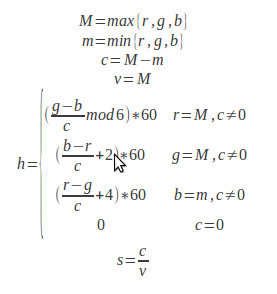
This function will create a HSV model from a RGB model. The algorithm behind the conversion is described by the formulas below.
RGB to HSV algorithm
The meaning of the variables:
M - the RGB component with the greatest value
m - the RGB component with the smalles value
c - chroma
r,g,b - the components of the RGB model (red, green, blue)
h,s,v - the components of HSV model (hue, saturation, value)

The components of the RGB model (r,g,b), saturation (s)  and value (v) should have values in the range [0,1], while the hue (h) should have values in the rnage [0,360].

The prototype of the function is:
/* Description:
 *  Creates a HsvColor structure from RGB components
 * Parameters:
 *  r,g,b - the components of an RGB model expressed
 *          as real numbers
 * Returns:
 *  A pointer to the HsvColor is the parameters are
 * correct. Otherwise returns NULL.
 */
HsvColor* Hsv_CreateFromRgbF(double r, double g, double b);
The function can be implemented as:
HsvColor* Hsv_CreateFromRgbF(double r, double g, double b)
{
    double M = 0.0, m = 0.0, c = 0.0;
    HsvColor* color = NULL;
    if (RgbF_IsValid(r, g, b) == true)
    {
        color = Hsv_Create(0.0, 0.0, 0.0);
        M = Double_GetMaximum(r, g, b);
        m = Double_GetMinimum(r, g, b);
        c = M - m;
        color->V = M;
        if (c != 0.0f)
        {
            if (M == r)
            {
                color->H = fmod(((g - b) / c), 6.0);
            }
            else if (M == g)
            {
                color->H = (b - r) / c + 2.0;
            }
            else /*if(M==b)*/
            {
                color->H = (r - g) / c + 4.0;
            }
            color->H *= 60.0;
            color->S = c / color->V;
        }
    }
    return color;
}
2.HSV to RGB Conversion
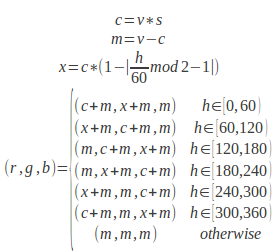
This function will create a RGB model from a HSV model. The algorithm behind the conversion is described by the formulas below.
HSV to RGB algorithm
The meaning of the variables:
c - chroma
m - the RGB component with the smalles value
x - an intermediate value used for computing the RGB model
r,g,b - the components of the RGB model (red, green, blue)
h,s,v - the components of HSV model (hue, saturation, value)

The components of the RGB model (r,g,b), saturation (s)  and value (v) should have values in the range [0,1], while the hue (h) should have values in the rnage [0,360].


The prototype of the function is:
/*
 * Description:
 *  Creates a RgbFColor structure from HSV components
 * Parameters:
 *  h,s,v - the components of an HSV model expressed
 *          as real numbers
 * Returns:
 *  A pointer to the RgbFColor is the parameters are
 * correct. Otherwise returns NULL.
 */
RgbFColor* RgbF_CreateFromHsv(double h, double s, double v);
The function can be implemented as:
HsvColor* Hsv_CreateFromRgbF(double r, double g, double b)
{
    double M = 0.0, m = 0.0, c = 0.0;
    HsvColor* color = NULL;
    if (RgbF_IsValid(r, g, b) == true)
    {
        color = Hsv_Create(0.0, 0.0, 0.0);
        M = Double_GetMaximum(r, g, b);
        m = Double_GetMinimum(r, g, b);
        c = M - m;
        color->V = M;
        if (c != 0.0f)
        {
            if (M == r)
            {
                color->H = fmod(((g - b) / c), 6.0);
            }
            else if (M == g)
            {
                color->H = (b - r) / c + 2.0;
            }
            else /*if(M==b)*/
            {
                color->H = (r - g) / c + 4.0;
            }
            color->H *= 60.0;
            color->S = c / color->V;
        }
    }
    return color;
}

The function can be implemented as:
RgbFColor* RgbF_CreateFromHsv(double h, double s, double v)
{
    double c = 0.0, m = 0.0, x = 0.0;
    RgbFColor *color = NULL;
    if (Hsv_IsValid(h, s, v) == true)
    {
        c = v * s;
        x = c * (1.0 - fabs(fmod(h / 60.0, 2) - 1.0));
        m = v - c;
        if (h >= 0.0 && h < 60.0)
        {
            color = RgbF_Create(c + m, x + m, m);
        }
        else if (h >= 60.0 && h < 120.0)
        {
            color = RgbF_Create(x + m, c + m, m);
        }
        else if (h >= 120.0 && h < 180.0)
        {
            color = RgbF_Create(m, c + m, x + m);
        }
        else if (h >= 180.0 && h < 240.0)
        {
            color = RgbF_Create(m, x + m, c + m);
        }
        else if (h >= 240.0 && h < 300.0)
        {
            color = RgbF_Create(x + m, m, c + m);
        }
        else if (h >= 300.0 && h < 360.0)
        {
            color = RgbF_Create(c + m, m, x + m);
        }
        else
        {
            color = RgbF_Create(m, m, m);
        }
    }
    return color;
}
3.Example
#include<stdio.h>
#include"colorspace.h"

int main(int argc, char** argv)
{
    HsvColor* hsv = NULL;
    RgbFColor* rgbF = NULL;
    RgbIColor* rgbI = NULL;

    /*HSI to RGB*/
    hsv = Hsv_Create(240.5, 0.316, 0.721);
    rgbF = RgbF_CreateFromHsv(hsv->H, hsv->S, hsv->V);
    rgbI = RgbI_CreateFromRealForm(rgbF->R, rgbF->G, rgbF->B);
    printf("\nHSV : %f %f %f", hsv->H, hsv->S, hsv->V);
    printf("\nRGBf : %f %f %f", rgbF->R, rgbF->G, rgbF->B);
    printf("\nRGBi : %d %d %d", rgbI->R, rgbI->G, rgbI->B);

    /*Frees the resources*/
    free(hsv);
    free(rgbF);
    free(rgbI);

    /*RGB to HSI*/
    rgbI = RgbI_Create(108U, 198U, 78U);
    rgbF = RgbF_CreateFromIntegerForm(rgbI->R, rgbI->G, rgbI->B);
    hsv = Hsv_CreateFromRgbF(rgbF->R, rgbF->G, rgbF->B);
    printf("\nHSV : %f %f %f", hsv->H, hsv->S, hsv->V);
    printf("\nRGBf : %f %f %f", rgbF->R, rgbF->G, rgbF->B);
    printf("\nRGBi : %d %d %d", rgbI->R, rgbI->G, rgbI->B);
    return 0;
}
/*Output:
HSV : 240.500000 0.316000 0.721000
RGBf : 0.495063 0.493164 0.721000
RGBi : 126 126 184
HSV : 105.000000 0.606061 0.776471
RGBf : 0.423529 0.776471 0.305882
RGBi : 108 198 78
 */

HSL - RGB Conversion Algorithms in C

In order to understand this article you should probably read this article first:

If you are curious about the theory behind the HSL and RGB color spaces, you should read this articles:

1.RGB To HSL Conversion
This function will create a HSL model from a RGB model. The algorithm behind the conversion is described by the formulas below.
RGB to HSL algorithm
The meaning of the variables:
M - the RGB component with the greatest value
m - the RGB component with the smalles value
c - chroma
r,g,b - the components of the RGB model (red, green, blue)
h,s,l - the components of HSL model (hue, saturation, lightness)

The components of the RGB model (r,g,b), saturation (s)  and intensity (i) should have values in the range [0,1], while the hue (h) should have values in the rnage [0,360].

The prototype of the function is:
/* Description:
 *  Creates a HslColor structure from RGB components
 * Parameters:
 *  r,g,b - the components of an RGB model expressed
 *          as real numbers
 * Returns:
 *  A pointer to the HslColor is the parameters are
 * correct. Otherwise returns NULL.
 */
HslColor* Hsl_CreateFromRgbF(double r, double g, double b);
The function can be implemented as:
HslColor* Hsl_CreateFromRgbF(double r, double g, double b)
{
    double M = 0.0, m = 0.0, c = 0.0;
    HslColor* color = NULL;
    if (RgbF_IsValid(r, g, b) == true)
    {
        M = Double_GetMaximum(r, g, b);
        m = Double_GetMinimum(r, g, b);
        c = M - m;
        color = Hsl_Create(0.0, 0.0, 0.0);
        color->L = 0.5 * (M + m);
        if (c != 0.0)
        {
            if (M == r)
            {
                color->H = fmod(((g - b) / c), 6.0);
            }
            else if (M == g)
            {
                color->H = ((b - r) / c) + 2.0;
            }
            else/*if(M==b)*/
            {
                color->H = ((r - g) / c) + 4.0;
            }
            color->H *= 60.0;
            color->S = c / (1.0 - fabs(2.0 * color->L - 1.0));
        }
    }
    return color;
}
2.HSL to RGB Conversion
This function will create a RGB model from an HSL model. The algorithm behind the conversion is described by the formulas below.
HSL to RGB algorithm
The meaning of the variables:
c - chroma
x - intermediate value used for computing r,g,b
m - intermediate value used for creating the r,g,b baseline
r,g,b - the components of the RGB model (red, green, blue)
h,s,l - the components of HSL model (hue, saturation, lightness)

The components of the RGB model (r,g,b), saturation (s)  and intensity (i) should have values in the range [0,1], while the hue (h) should have values in the rnage [0,360].

The prototype of the function is:
/*
 * Description:
 *  Creates a RgbFColor structure from HSL components
 * Parameters:
 *  h,s,l - the components of an HSL model expressed
 *          as real numbers
 * Returns:
 *  A pointer to the RgbFColor is the parameters are
 * correct. Otherwise returns NULL.
 */
RgbFColor* RgbF_CreateFromHsl(double h, double s, double l);
The function can be implemented as:
RgbFColor* RgbF_CreateFromHsl(double h, double s, double l)
{
    RgbFColor* color = NULL;
    double c = 0.0, m = 0.0, x = 0.0;
    if (Hsl_IsValid(h, s, l) == true)
    {
        c = (1.0 - fabs(2 * l - 1.0)) * s;
        m = 1.0 * (l - 0.5 * c);
        x = c * (1.0 - fabs(fmod(h / 60.0, 2) - 1.0));
        if (h >= 0.0 && h < (HUE_UPPER_LIMIT / 6.0))
        {
            color = RgbF_Create(c + m, x + m, m);
        }
        else if (h >= (HUE_UPPER_LIMIT / 6.0) && h < (HUE_UPPER_LIMIT / 3.0))
        {
            color = RgbF_Create(x + m, c + m, m);
        }
        else if (h < (HUE_UPPER_LIMIT / 3.0) && h < (HUE_UPPER_LIMIT / 2.0))
        {
            color = RgbF_Create(m, c + m, x + m);
        }
        else if (h >= (HUE_UPPER_LIMIT / 2.0)
                && h < (2.0f * HUE_UPPER_LIMIT / 3.0))
        {
            color = RgbF_Create(m, x + m, c + m);
        }
        else if (h >= (2.0 * HUE_UPPER_LIMIT / 3.0)
                && h < (5.0 * HUE_UPPER_LIMIT / 6.0))
        {
            color = RgbF_Create(x + m, m, c + m);
        }
        else if (h >= (5.0 * HUE_UPPER_LIMIT / 6.0) && h < HUE_UPPER_LIMIT)
        {
            color = RgbF_Create(c + m, m, x + m);
        }
        else
        {
            color = RgbF_Create(m, m, m);
        }
    }
    return color;
}
3.Example
#include<stdio.h>
#include"colorspace.h"

int main(int argc, char** argv)
{
    HslColor* hsl = NULL;
    RgbFColor* rgbF = NULL;
    RgbIColor* rgbI = NULL;

    /*HSI to RGB*/
    hsl = Hsl_Create(84.0, 1.0, 0.4);
    rgbF = RgbF_CreateFromHsl(hsl->H, hsl->S, hsl->L);
    rgbI = RgbI_CreateFromRealForm(rgbF->R, rgbF->G, rgbF->B);
    printf("\nHSL : %f %f %f", hsl->H, hsl->S, hsl->L);
    printf("\nRGBf : %f %f %f", rgbF->R, rgbF->G, rgbF->B);
    printf("\nRGBi : %d %d %d", rgbI->R, rgbI->G, rgbI->B);

    /*Frees the resources*/
    free(hsl);
    free(rgbF);
    free(rgbI);

    /*RGB to HSI*/
    rgbI = RgbI_Create(108U, 198U, 78U);
    rgbF = RgbF_CreateFromIntegerForm(rgbI->R, rgbI->G, rgbI->B);
    hsl = Hsl_CreateFromRgbF(rgbF->R, rgbF->G, rgbF->B);
    printf("\nHSL : %f %f %f", hsl->H, hsl->S, hsl->L);
    printf("\nRGBf : %f %f %f", rgbF->R, rgbF->G, rgbF->B);
    printf("\nRGBi : %d %d %d", rgbI->R, rgbI->G, rgbI->B);
    return 0;
}
/*
HSL : 84.000000 1.000000 0.400000
RGBf : 0.480000 0.800000 0.000000
RGBi : 122 204 0
HSL : 105.000000 0.512821 0.541176
RGBf : 0.423529 0.776471 0.305882
RGBi : 108 198 78
 */
Related Posts Plugin for WordPress, Blogger...