Showing posts with label Operators. Show all posts

Thursday, November 24, 2011

Precedence of Operators in Java

Not every boolean or arithmetic operation needs to be parenthesised in order to make sure that the expression is evaluated correctly. Java has an in-built set of rules concerning the precedence of operators in accordance to calculus (and logic) rules.

In the list below the operators are grouped according to their priority (precedence) in the evaluation process of an expression: Operators which are in the same group have the same priority.The groups are numbered from 1 to 15, where 1 represents the highest precedence and 15 the lowest precedence.
  1. Dot operator, array brackets, method invocation: . [] ()
  2. Postfix operators ++  -- (as in a++, a--)
  3. Prefix operators ++  -- (as in ++a, --a), logical and bitwise not ! ~ and the unary operators + - (as in x=-3 or y=+5)
  4. Type casts () and object creation operator  new
  5. Arithmetic operators % * /
  6. Arithmetic operators: + - and the string concatenation operator +
  7. Bit shift operators : >>  <<  >>> (the unsigned right shift operator)
  8. Relational type comparison: <   >  <=   >= and instanceof
  9. Condition checking operators == !=
  10. Bitwise and: &
  11. Bitwise or |
  12. Conditional and:  &&
  13. Conditional or: ||
  14. Conditional operator ?:
  15. Assignment operators :  =  \=  *=  +=  -=  %=  &=  |=  <<=  >>=  >>>=
Precedence influences the evaluation order in the following way:
  • Operators with higher precedence are evaluated before operators with lower precedence.
  • When operators of equal precedence appear in the same expression binary operators (all groups described above except 2,3,4 and 14,15) are evaluated from left to right. Assignment operators (the groups 2,3,5 and 14,15) are evaluated from right to left.
Example:
      int a = 4, b = 2;
      int c = 0;
      c = ++a % b-- * 2 + 5;
      //
      //(1)++a is evaluated first  => a becomes equal to 5
      //    c = 5 % b-- * 2 +5;
      //(2)b-- is evaluated second => b will become equal to 1 after 
      //    a value will be assigned to c
      //    c = 5 % 2 * 2 + 5
      //(3)% - is evaluated third   => 5 % 2 = 1
      //   c = 1 * 2 + 5
      //(4)* - is evaluated forth   => 1 * 2 = 2
      //   c = 2 + 5
      //(5)+ - is evaluated fifth   => 2 + 5 = 7
      //  c = 7
      //(6)= - is evaluated last => c becomes equal to 7
      //After the expression is evaluated b becomes equal to 1
      System.out.println("a="+a+"\n"+
                         "b="+b+"\n"+
                         "c="+c);
      //Output
      //a=5
      //b=1
      //c=7
Note that the example code above is pretty bad in terms of programming style and it should be regarded only as a demonstration on how the compiler evaluates an expression.

Example:
      String testString1 = "";
      testString1 = 1 + 2 + 3 + "Look at me!";
      //The string concatenation operator +  and the arithmetic +
      //have the same precedence, so the evaluation will start from 
      //left to right:
      //(1)The first + is considered arithmetic =>  1 + 2 = 3
      //testString1 = 3 + 3 + "Look at me!";
      //(2)The second + is also considered arithmetic => 3 + 3 = 6
      //testString1 = 6 + "Look at me!";
      //(3)The third + is considered the concatenation operator,
      //so 6 will be converted to the temporary string which will
      //hold the value "6" => "6" + "Look at me!" = "6Look at me!"
      //testString1 = "6" + "Look at me!" = "6Look at me!";
      //(4)The assignment operator will be evaluated last =>
      //testString1 will contain the value "6Look at me!"
      //String testString2 = "";
      testString2 = "Look at me!" + 1 + 2 + 3;
      //The string concatenation operator +  and the arithmetic +
      //have the same precedence, so the evaluation will start
      //from left to right:
      //(1)The first + is considered as being a concatenation
      //operator and the second operand 1 will be converted to the
      //string "1" => "Look at me!"+"1" = "Look at me1"
      //testString2 = "Look at me!" + "1" + 2 + 3 =
      //            = "Look at me!1" + 2 + 3
      //(2)The second + is also considered as being a concatenation
      //operator the the second operand 2 will be converted to the
      //string "2" => "2" + "Look at me1" = "Look at me12"
      //testString2 = "Look at me!1" + 2 + 3 =
      //            = "Look at me!12" + 3
      //(3)The third + is also considered as being a concatenation
      //operator the the second operand 3 will be converted to the
      //string "3" => "3" + "Look at me12" = "Look at me123"
      //testString2 = "Look at me!12" + "3" =
      //     = "Look at me!123"
      //(4)The assignment operator will be evaluated last =>
      //testString1 will contain the value "Look at me!123" */
      String testString3 = "";
      testString3 = "Look at me!" + (1 + 2 + 3);
      //First will be evaluated what is in the round parenthesis
      //from left to right:
      //(1)The first + is considered as being arithmetic => 
      //1 + 2 = 3
      //testString3 = "Look at me!" + (3 + 3);
      //(2)The second + is considered as being arithmetic also =>
      //3 + 3 = 6
      //testString3 = "Look at me!" + 6;
      //(3)After the parenthesis was evaluated, the remaining + will
      //be considered as a concatenation operator:
      //testString3 = "Look at me!" + "6" = "Look at me!6"
      //(4)The assignment operator will be evaluated last =>
      //testString1 will contain the value "6Look at me!"*/
      System.out.println(testString1 + "\n" +
                         testString2 + "\n" +
                         testString3 + "\n");
      //Output
      //6Look at me!
      //Look at me!123
      //Look at me!6
Note:
Because the current syntax highliter I'm using seems to have a problem with /* */ comments (it doesn't recognize */,  so it will highlight everything), I had to use // for each line.

Short Circuit Evaluation

Short circuit evaluation (also called "lazy" evaluation or McCarthy Evaluation) is a commonly used method for avoiding the execution of a second expression contained in a conditional clause.

Speaking plainly, it means that when you use an if instruction that has 2 or more clauses, if the first condition is not met (when the conditions are connected by an AND operator) or if the first condition is met (when the conditions are connected by an OR operator), the program will not evaluate the second expression.

The short circuit evaluation is available for C, C++, Java, C# and VB (and most of the other programming languages. See this for the full list). 

It is commonly used for:
  • Checking before a division that the denominator is not equal to 0
  • Checking if a pointer is allocated before doing some operation with the data that he is pointing to.
Also, short circuit evaluation helps optimizing the code since an if statement that contains 5 clauses will end very quickly if one condition is not respected (without continuing to evaluate the other clauses), so your program will run more quickly.

Division check example for C\C++, Java and C#:
int a = 0, b = 32;
if ( (a != 0) && (b / a > 10) )
   //Will not go here because a=0
else
   //Will go here without triggering an divide by zero error/exception
Division check example for VB.NET
Dim x, y As Integer
x = 0
y = 32
If ( (x <> 0) AndAlso (x / y > 10) ) Then
   'Will not go here because x=0
Else
   'Will go here without triggering an division by zero exception
End If
Pointer example for C\C++
//We shall assume that you have a structure/class with a field
//(a public field in//case of C++) data.
MyStruct *myStructPointer = NULL;
if ( (myStructPointer!=null) && (myStructPointer.data == 5) )
   //Will not go here because myStructPointer = null
else
   //Will go here without triggering a null error/exception
Pointer (Reference) example for Java and C#
//We shall assume that you have a class containing
//a public field called data.
Xobject myObject = null;
if ( (myObject!=null) && (myObject.data == 5) )
   //Will not go here because myObject = null
else
   //Will go here without triggering a null error/exception
Pointer (Reference) example for VB. NET
If ( (str <> Nothing) AndAlso (str.Equals("Bird") ) Then
   'Will not go here because x=0
Else
   'Will go here without triggering a null exception
End If
In VB.NET the short circuit OR operator is OrAlso.

In some cases you may not want to use short circuit evaluation, but rather let the program evaluate all clauses. In this case you will need to use "eager" operators like (in contrast to the "lazy" operators used in short circuit evaluation):
  • C++\C#\Java : & instead of && and | instead of ||
  • Java has also : and instead of && and or instead of ||
  • VB.NET : and instead of andAlso and or instead of orAlso 
  • C doesn't have "eager" operators and all evaluation is done short-circuit only.
"Eager" operators are mostly used when your second condition consists of a function that modifies some of your other variables (but this corresponds in most cases to a bad programming style).

Tuesday, October 18, 2011

The Conditional Operator

The conditional operator ?: allows writing more simple conditional expressions in  which you can select one of two statements according to a logical condition.

Syntax
(condition)?(condition_true_statement):(condition_false_statement)

Example:
int i=3,j;
(i==3)?(j=5):(j=3);
//j will become equal to 5
Also, the conditional operator can be used for assigning a value to a variable according to a condtion.

Syntax
variable = (condition)?(condition_true_value):(condition_false_value)

Example:
int i=3,j;
j=(i==3)?(5):(3);
//j will become equal to 5
The conditional operator is mostly used in the C language, but is accepted also in C++, C# and Java (still, some people consider it not fit for object-oriented programming).

Bitwise Shifts and Rotations in C

In the examples below, I shall use the uint8_t datatype (8 bits integer) from the stdint.h library. If you never used it before or if you have difficulties with the "basic" bitwise operations you should read this first.

1.Shift left operation
Description
Shifting bits left with n positions means moving every bit from its position n positions to the left starting with the leftmost bit. The bits who are added right will have the value 0.
Example:

Bits
7th
6th
5th
4th
3th
2nd
1st
0th

a
0
1
1
0
1
0
1
1
107
a<<3
0
1
0
1
1
0
0
0
88  
In the first row, the bits who will be lost have a red background, and the bits who will be shifted have a green background. In the second row the bits who were added have a red background and the bits who were shifted have a green background.
Syntax
#include<stdio.h>
#include<stdint.h>

int main(void)
{
   uint8_t a = 107U;
   uint8_t ashiftleft3 = a<<3;
   printf("a<<3 %u",ashiftleft3);
   return 0;
}
/*Output
a<<3 88
*/
2.Shift right operation
Description
Shifting bits right with n positions means moving every bit from its position n positions to the right starting with the rightmost bit. The bits who are added left will have the value 0. 
Example:

Bits
7th
6th
5th
4th
3th
2nd
1st
0th

a
0
1
1
0
1
0
1
1
107
a<<3
0
0
0
0
1
1
0
1
13
In the first row, the bits who will be lost have a red background, and the bits who will be shifted have a green background. In the second row the bits who were added have a red background and the bits who were shifted have a green background.
Syntax:
#include<stdio.h>
#include<stdint.h>

int main(void)
{
   uint8_t a = 107U;
   uint8_t ashiftrightt3 = a>>3;
   printf("a>>3 %u",ashiftrightt3);
   return 0;
}
/*Output
a<<3 88
*/
3.Rotate left operation
Description
Rotating left with n positions means moving the first n leftmost bits from their position to the right of the rightmost bit.

Some compilers have the function unsigned int _rotl(unsigned int number, unsigned int bits) which performs a left rotation, but the function is not considered ANSI. Also, the function uses 32 bits instead of 8. The _rotl function can be found in the stdlib.h library.

If you do not have this function for your compiler (or you want its 8 bit version), you can easily implement it as:
uint8_t _rotl(uint8_t value, uint8_t shift)
{
   if ((shift &= 7) == 0)
   {
      return value;
   }
   else
   {
      return ((value << shift) | (value >> (8 - shift)));
   }
}
Example 
Bits
7th
6th
5th
4th
3th
2nd
1st
0th

a
0
1
1
0
1
0
1
1
107
Bits
4th
3th
2nd
1st
0th
7th
6th
5th

_rotl(a,3)
0
1
0
1
1
0
1
1
91
Syntax:
#include<stdio.h>
#include<stdint.h>

uint8_t _rotl(uint8_t value, uint8_t shift);

int main(void)
{
   uint8_t a = 107U;
   uint8_t arotl3 = _rotl(a,3);
   printf("arotl3 %u",arotl3);
   return 0;
}
/*Output
arotl3 91
*/
4.Rotate right operation
Description
Rotating right with n positions means moving the first n rightmost bits from their position to the left of the leftmost bit.

Some compilers have the function unsigned int _rotr(unsigned int number, unsigned int bits) which performs a right rotation, but the function is not considered ANSI. Also, the function uses 32 bits instead of 8. The _rotl function can be found in the stdlib.h library.

If you do not have this function for your compiler (or you want its 8 bit version), you can easily implement it as:
uint8_t _rotr(const uint8_t value, uint8_t shift)
{
    if( (shift &= 7) == 0)
    {
        return value;
    }
    else
    {
        return ( (value >> shift) | (value << (8 - shift)) );
    }
}
Example 
Bits
7th
6th
5th
4th
3th
2nd
1st
0th

a
0
1
1
0
1
0
1
1
107
Bits
2nd
1st
0th
7th
6th
5th
4th
3th

_rotr(a,3)
0
1
1
0
1
1
0
1
109
Syntax
#include<stdio.h>
#include<stdint.h>

uint8_t _rotr(uint8_t value, uint8_t shift);

int main(void)
{
   uint8_t a = 107U;
   uint8_t arotr3 = _rotr(a,3);
   printf("arotl3 %u",arotr3);
   return 0;
}
/*Output
arotl3 109
*/

Question: In which context do you use shifts and rotations?

References:
http://en.wikipedia.org/wiki/Bitwise_operations_in_C

Monday, October 17, 2011

Bitwise Operators in ANSI C

The basic bitwise operations are NOT, AND, OR and XOR.

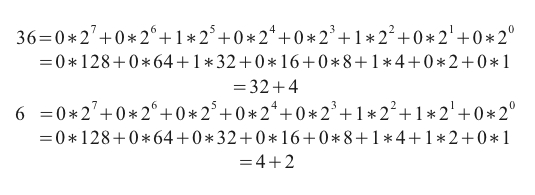
Let us consider two 8 bit numbers a and b where a = 36 and b = 6.


2^72^62^52^42^32^22^12^0

1286432168421
3600100100
600000110

The best way for working with bits and bytes is by using the stdint.h ANSI library. This library helps you by making your code more portable (some compilers have 16 bit integers and 32 bit long integers, while others have 32 bit integers and 64 bit long integers)
Binary decomposition example
stdint.h provides 8, 16, 32 and 64 bit compiler-independent primitive data types both signed and unsigned.

In the examples below, I will use unsigned 8 bit integers, which shall translate to the uint8_t type.

To include the library when using C:
#include<stdint.h>
1.NOT operation
Description
Basically, negating a number means that every 0 becomes and every 1 becomes 0.

a 0 0 1 0 0 1 0 0 36
~a 1 1 0 1 1 0 1 1 219
b 0 0 0 0 0 1 1 0 6
~b 1 1 1 1 1 0 0 1 249

Syntax
#include<stdio.h>
#include<stdint.h>

int main(void)
{
   uint8_t a = 36;
   uint8_t b = 6;
   uint8_t nota = ~a;
   uint8_t notb = ~b;
   printf("~a %u\n",nota);
   printf("~b %u\n",notb);
   return 0;
}
/*Output
~a 219
~b 249
*/
2.AND operation
Description
The bitwise AND operation compares the bits on every position and if both bits are 1, the result bit will be 1. Otherwise, the result bit will be 0.
a 0 0 1 0 0 1 0 0 36
b 0 0 0 0 0 1 1 0 6
a AND b 0 0 0 0 0 1 0 0 4
Syntax
#include<stdio.h>
#include<stdint.h>

int main(void)
{
   uint8_t a = 36;
   uint8_t b = 6;
   uint8_t aandb = a&b;
   printf("a&b %u\n",aandb);
   return 0;
}
/*Output
a&b 4
*/ 
3.OR operation
Description
The bitwise OR operation compares the bits on every position and if one of the bits is 1, the result will be 1. Otherwise (if both bits are 0), the result will be 0.
a 0 0 1 0 0 1 0 0 36
b 0 0 0 0 0 1 1 0 6
a OR b 0 0 1 0 0 1 1 0 38
Syntax
#include<stdio.h>
#include<stdint.h>

int main(void)
{
   uint8_t a = 36;
   uint8_t b = 6;
   uint8_t aorb = a|b;
   printf("a|b %u",aorb);
   return 0;
}
/*Output
a|b 38
*/
4.XOR operation
Description
The bitwise XOR operation compares the bits on every position and if one of the bits is 1 and the other is 0 the result will be 1. Otherwise (if both bits are 1 or 0) the result will be 0.
a 0 0 1 0 0 1 0 0 36
b 0 0 0 0 0 1 1 0 6
a XOR b 0 0 1 0 0 0 1 0 34
Syntax
#include<stdio.h>
#include<stdint.h>

int main(void)
{
   uint8_t a = 36;
   uint8_t b = 6;
   uint8_t axorb = a^b;
   printf("a^b %u",axorb);
   return 0;
}
/*Output
a^b 34
*/
Below you can see the logic table for the AND, OR and XOR operations:
a b AND OR XOR
0 0 0 0 0
0 1 0 1 1
1 0 0 1 1
1 1 1 1 0


Question: In which context do you use bitwise operations?

References:
http://en.wikipedia.org/wiki/Bitwise_operations_in_C
Related Posts Plugin for WordPress, Blogger...